Mr Autofire
- 4.5
- Rating
- 10.00M
- Installs
- Free
- Price

 Analysis by App-foxy
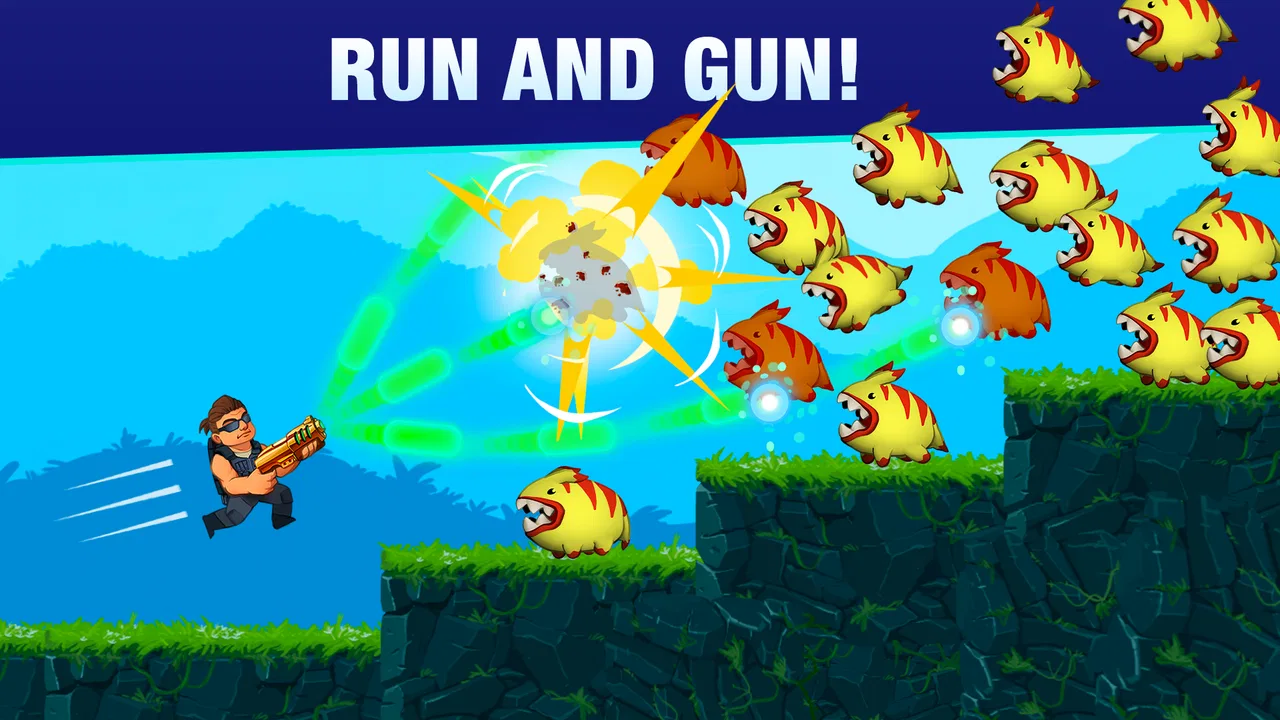
I picked up Mr Autofire expecting a quick arcade shooter, and that is exactly where it works best: in short sessions when I want movement, aiming, and a little pressure without committing to a long story or complicated setup. It is an action game from Lightheart Entertainment in which I guide a hero through dangerous stages, jump between platforms, fire at aliens, and gradually build a stronger character. The controls are simple to understand, but the timing becomes much less forgiving once the screen fills with threats.
What makes it interesting for a shared household device is that it is easy to start playing without a long explanation. Someone can hand over the phone or tablet, and the basic idea is immediately clear. At the same time, progress and purchases make it worth setting a few boundaries before several people use the same device. I enjoyed the game most when I treated each run as a focused attempt rather than expecting a relaxed, completely consequence-free experience.
How it feels in everyday play
The central loop is built around running, jumping, shooting, surviving, and improving. My character moves through compact combat sections where enemies appear from different positions and the safest route is rarely obvious at first. I had to watch the platforms as carefully as the aliens, because a careless jump can leave me exposed or send me into danger before I have time to react.
You May Also Like

 Blood Strike: 2.5 Anniversary
Blood Strike’s Loadouts Turn Every Drop Into a Tactical Gamble
A close look at Blood Strike’s custom loadouts: how fast access to signature weapons reshapes its battle royale rhythm, rewards preparation, and narrows the gap between fights.

 Pandora - Music & Podcasts
Pandora’s Music Is Easy to Start, but Harder to Recover
Pandora’s strength is its low-effort path from a seed to a station. Its weak spot is how much confidence it asks you to place in connection, setup, and quiet recovery.

 8 Ball Pool
 Is Built on Rivalries, Rematches, and Routine
A close look at the rivalries, rematches, shared routines, and unanswered safety questions that turn a quick pool match into a persistent mobile community.

 Samsung Music
’s Quiet Strength Is Playing What You Already Own
Its reach comes less from spectacle than from dependable access to a personal library. That simplicity is both the app’s strongest retention engine and its ceiling.

 AccuWeather: Weather Radar
AccuWeather Review: A Quick, Clear Forecast for Everyday Decisions
For everyday plans, the best forecast is the one you can understand quickly. AccuWeather makes rain timing, radar, and local conditions easy to act on, with a few trade-offs.

 Hill Climb Racing
Why Hill Climb Racing Still Turns Crashes Into One More Run
A tiny car, a bumpy hill and one more upgrade: Hill Climb Racing keeps resurfacing because its simple chaos makes every near-miss feel personal.
More From Our News Desk
View All News


The automatic-fire idea keeps the action moving. I can concentrate on positioning, dodging, and choosing when to take a risk instead of constantly tapping a separate attack button. That makes the game approachable for a younger or less experienced player, but it does not make it effortless. The challenge comes from reading enemy patterns, using the available space, and avoiding panic when several hazards arrive together.
I found the best everyday use case to be a short break: a few attempts while waiting, during a commute, or between household tasks. A run can feel meaningful even when it ends quickly because failure still teaches me something about timing or enemy placement. It is also easy to stop after an attempt instead of needing to reach a long checkpoint.
That convenience has a trade-off. The repeated structure can become familiar if I play for a long stretch, especially when I am looking for a large variety of activities rather than a focused arcade challenge. Players who prefer open exploration, deep dialogue, or a long cinematic campaign will probably find this too narrow. Its appeal comes from refining reactions and making gradual progress, not from presenting a broad world to wander through.
Why the controls suit a shared phone
On a shared phone, straightforward controls are a real advantage. I do not need to explain a complex button layout before another person can try a stage. The important lesson is that movement matters more than frantic tapping. I usually get better results by watching where the next safe landing point will be, then letting the weapon handle the attack while I focus on survival.
That approach also gives two players with different skill levels a fairer starting point. A beginner can understand the objective quickly, while a more experienced player can work on cleaner movement and better decisions. It is not a multiplayer coordination game, so household members are not playing together in the same moment, but they can still compare attempts and discuss which jumps or enemy groups caused trouble.
One useful habit is to pause mentally between encounters rather than rushing forward just because the character is already moving. I found that a short look at the platforms and enemy positions often mattered more than aggressive movement. This is a small but important distinction from many basic mobile shooters: success is less about pressing faster and more about keeping control of the route.
What progression adds to the action
Progression gives the game a reason to keep returning. Stronger heroes and improved abilities make later attempts feel connected to earlier ones, and the promise of a better run can turn a failed attempt into motivation rather than a dead end. I liked having a sense that practice and upgrades were working together, although the experience is still built around repeating action rather than discovering a completely new type of play every time.
My advice is to avoid spending immediately just because a stage becomes difficult. First, I would replay earlier sections and pay attention to the mistake that caused the failure. Sometimes the problem is not a weak character but a rushed jump, poor positioning, or an attempt to attack from an unsafe platform. This is one of the more useful trade-offs in the game: upgrades can help, but they do not replace learning the movement.
The game is free to download, which makes trying it with a household device uncomplicated. However, in-app purchases range from $0.99 to $199.99 per item. That is a wide range, and it is the main reason I would discuss purchasing expectations before letting a child or guest play on a device connected to a payment method. The game can be sampled without paying, but the presence of optional spending changes how carefully I would manage a shared setup.
Sharing one device without mixing expectations
On a shared device, I’d make the handoff about more than whose turn comes next: agree first on whether everyone is playing toward the same progress, and keep changes to upgrades or resources visible to the next person. That small bit of coordination prevents surprises and gives each player a fair chance to learn from the previous run. It also helps set up the next decision: whether this kind of turn-taking suits your household at all.
Start with clear setup boundaries
Before sharing the game, I would decide who is allowed to play and who is allowed to make purchases. That sounds obvious, but action games with upgrades can encourage quick decisions after a frustrating defeat. A child may see an improvement as the natural next step, while the device owner may expect every purchase to be discussed first. A simple household rule avoids confusion: playing is open, spending requires permission.
I would also make sure everyone knows whether the device is being used for one person’s progress or for casual turns. The game is not a good fit for pretending that several people have completely separate journeys if the same local progress is being used. A younger player may assume that changing a hero or making an upgrade only affects their own attempts. Explaining the boundary in plain language is more useful than assuming they will understand it from the interface.
For a shared phone, I prefer short, agreed sessions. That keeps the game from taking over the device and makes handoffs easier. It also reduces arguments about who gets another attempt after a failure. A practical routine is to finish the current run, show the result, and then pass the phone rather than interrupting someone in the middle of a difficult section.
Because the game is designed around individual action rather than live cooperation, I would not present it as a family game in the same sense as a board game or a cooperative title. It can be shared, but the sharing is turn-based and conversational. That distinction matters: the fun comes from watching, comparing, and giving advice, not from controlling different characters together.
Coordinate turns and progress deliberately
Coordination works best when the household agrees on what counts as a complete turn. I would use a run or a natural stopping point instead of an arbitrary timer, since stopping during a tense section can feel unfair. If the device has to be handed over quickly, the player should finish the immediate encounter before passing it along.
Another helpful rule is to avoid changing the setup for someone else without telling them. If one person improves a hero, chooses a different option, or spends a resource, the next player should know what changed. This is not about treating a game like a formal account system; it is simply common courtesy when several people use one progression path.
I also found that advice should stay specific. Saying “be careful” does not help much. Saying “wait for a safe platform before moving upward” gives the next player something practical to try. That makes the game more social without pretending it has a built-in cooperative mode. A skilled player can coach a beginner, but the beginner still has to perform the jump and manage the danger personally.
For siblings or friends sharing a tablet, I would keep the device owner involved in any decision that affects progress or spending. The game’s quick action can make a small change feel harmless, yet the consequences may be visible to everyone who plays afterward. Clear communication is more reliable than relying on assumptions about who was using the device at the time.
Age, trust, and the right kind of supervision
The content rating is Everyone 10+, which fits my impression of the game as accessible action with alien enemies rather than a mature experience. Still, an age label does not tell me whether every child will enjoy the pressure or handle the retry cycle well. Some players like repeating a stage until the timing improves; others become frustrated when progress depends on several accurate decisions in a row.
For younger players within that age range, I would watch the first few sessions and see how they respond to failure. The useful conversation is not only about whether the game is suitable, but also about whether they can stop when asked and whether they understand that purchases are optional. A child who enjoys the action but struggles with frustration may benefit from shorter turns and encouragement to take a break.
Trust also matters for account boundaries. I would not hand over a shared device with an unrestricted payment method and assume the game itself will prevent an accidental purchase. Since the available purchase range reaches from small amounts to much larger individual items, the responsible choice is to keep spending decisions with the adult or account owner. That is a household practice, not a gameplay feature, and it is worth making explicit.
There is another boundary I would explain: the game is entertainment, not a reason to ignore homework, sleep, meals, or shared device needs. Its short-session design makes it easy to fit into spare time, but the upgrade loop can encourage “one more attempt.” In my experience, agreeing on when the phone must be returned is more effective than trying to negotiate after a difficult run has already started.
Where it stands beside other mobile action games
Compared with a traditional platformer, this game puts more attention on shooting and survival than on carefully designed jumps alone. Compared with a larger action role-playing game, it is much quicker to understand and less dependent on story, exploration, or lengthy menus. I would choose it when I want a compact arcade loop, not when I want a substantial world or a deep social system.
It also differs from competitive online action games because the pressure is mainly personal. I am not worrying about a teammate blaming me or an opponent outplaying me in real time. That makes it easier to recommend for a household where people have different schedules or skill levels. Each person can take a turn when the device is available, then talk about the attempt afterward.
The compromise is that there is less direct cooperation and less variety than in games built specifically for groups. If the main goal is to play together at the same time, a local multiplayer or cooperative title would be a better choice. If the goal is to pass around one device and enjoy quick attempts, this format makes more sense.
Practical details before downloading
The game is free, carries a 4.5 average from around 118 thousand ratings, and has passed 10 million installs. Those figures suggest a substantial player base, but they do not change the more personal question: do you enjoy repeating action stages and improving through practice? I would treat the popularity as a reason to try it, not as proof that it will match every player’s taste.
It was released on November 19, 2019, and the current version is 5.0.0. The minimum operating system is Android 7.1, so it can suit many older Android devices, although actual comfort will still depend on the phone or tablet’s condition and screen size. On a small screen, I would pay extra attention to whether my fingers obscure the action during frantic moments.
The age rating, free entry, and simple controls make it easy to introduce to a household. The purchase range means I would separate “can play” from “can buy,” and the individual progression means I would explain whose progress is being changed. Those three points answer most of the practical questions I would have before installing it on a shared device.
My household verdict
I recommend Mr Autofire to households that want a quick, readable action game for individual turns. It is especially suitable for players who enjoy learning enemy patterns, improving movement, and trying again after a mistake. The automatic firing keeps the controls approachable, while the platform layout and incoming threats provide enough pressure to stop the game from feeling completely passive.
I would skip it for anyone looking for a calm experience, a story-heavy adventure, or genuine same-screen cooperation. I would also be cautious about sharing it with a child who is likely to make impulsive purchases or become upset by repeated failure. The game itself is easy to begin, but responsible shared use still requires clear rules around progress, turns, and spending.
My strongest household tip is to treat the game as a conversation starter rather than a silent time filler. Let one person play, let another point out a safer route, and discuss whether an upgrade is actually needed before changing anything. That approach makes the action more enjoyable and teaches the useful lesson that better decisions can matter as much as stronger equipment.
In the end, Lightheart Entertainment has made a focused mobile shooter that earns its place through quick controls and repeatable challenges rather than complexity. I would install it for short breaks, pass it around carefully, and keep purchase boundaries firm. For the right player, the best part is the small improvement from one attempt to the next; for everyone else, the limited variety and solitary structure are good reasons to choose a different action game.
FAQs for Mr Autofire
01What is Mr Autofire and how does the gameplay work?
Mr Autofire is a fast-paced 2D action platformer built around automatic shooting. You control the hero while moving, jumping, and dodging attacks through increasingly difficult rooms filled with enemies and hazards. Because your weapon fires automatically, the main challenge is positioning, timing jumps, choosing upgrades, and surviving each encounter rather than aiming every shot manually.
02Is Mr Autofire free to download and play?
Yes, Mr Autofire can be downloaded and played for free on supported Android and iOS devices. However, it uses optional in-app purchases and may include advertising or other progression boosts. You can make progress without paying, but upgrading characters, weapons, equipment, or energy-related resources may take longer if you choose not to spend money.
03Does Mr Autofire require an internet connection?
An internet connection may be needed for several features, including advertisements, cloud-related services, events, account functions, and in-app purchases. Some gameplay may work temporarily offline, but the experience is not guaranteed to be fully available without connectivity. For the most reliable access to rewards, updates, and progression, playing while connected is recommended.
04Is Mr Autofire suitable for children and casual players?
Mr Autofire is easy to understand because the controls are simple and shooting happens automatically, making it approachable for casual players. Nevertheless, the difficulty rises quickly, and repeated attempts are part of the experience. Parents should also review the game’s age rating, advertising, in-app purchase options, and any online features before allowing younger players to download it.
05What are the main advantages and disadvantages of Mr Autofire?
The game’s strongest points are its responsive controls, short action-focused stages, colorful presentation, varied upgrades, and satisfying roguelike progression. It works well for quick sessions but can become repetitive because many runs follow a similar structure. Progression may also feel slow without patience, while ads, energy systems, and optional purchases can affect the overall experience.
Pros
- Fast
- satisfying shooting makes short play sessions enjoyable.
- Auto-fire controls are easy to learn and work well on mobile.
- Many weapons and heroes encourage experimentation.
- Levels offer varied enemies
- hazards
- and boss encounters.
- Runs feel rewarding thanks to upgrades and collectible resources.
Cons
- Progress can become grindy when stronger upgrades require repeated runs.
- Energy or progression limits may interrupt longer play sessions.
- Random upgrades can make some runs feel unbalanced.
- Later stages may feel difficult without investing in upgrades.
- Ads and in-app purchases can affect the free-to-play experience.

Mr Autofire
Gallery